
How to Recover a TikTok Account Without Email or Phone Number
Lost access to the email address and phone number linked to your TikTok account? Don't panic: there's an official way to recover a TikTok account without email or phone number, through TikTok's support form. You prove the account is yours, and support helps you get back in. Here's how to do it, step by step.
Prefer a video? Watch the full tutorial below.
Recovering a TikTok account without email or phone number, step by step
On the login screen, ask for help
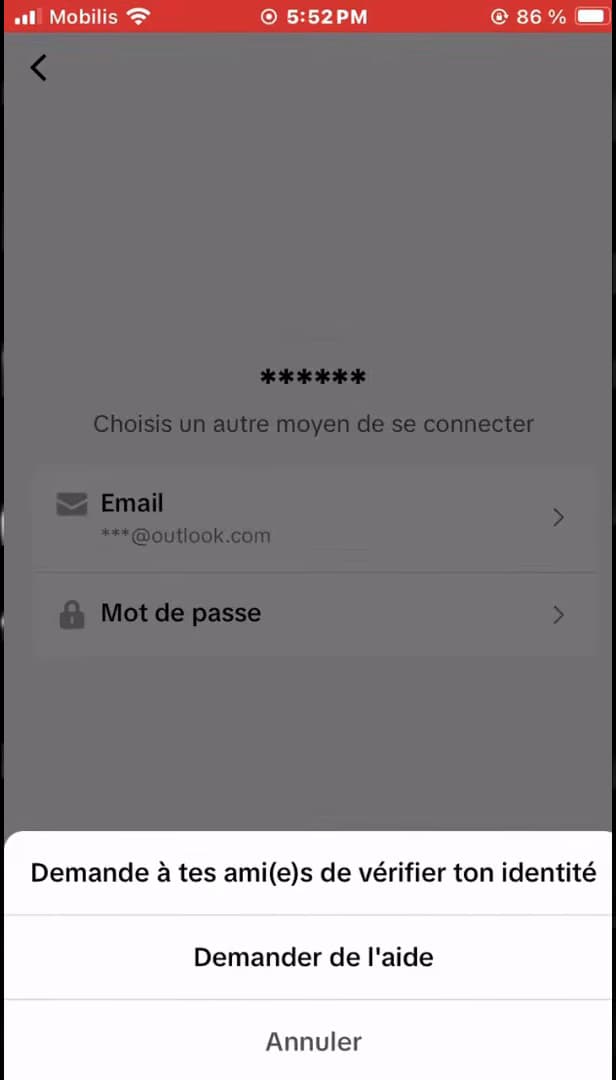
"Request help" opens TikTok's recovery form. Open "TikTok," tap "Log in," then choose "Use phone / email / username" and the "Username" tab. Enter your username and tap "Next." Since you can't receive the code, tap "Can't log in?", then "Request help."
Choose "Account recovery"
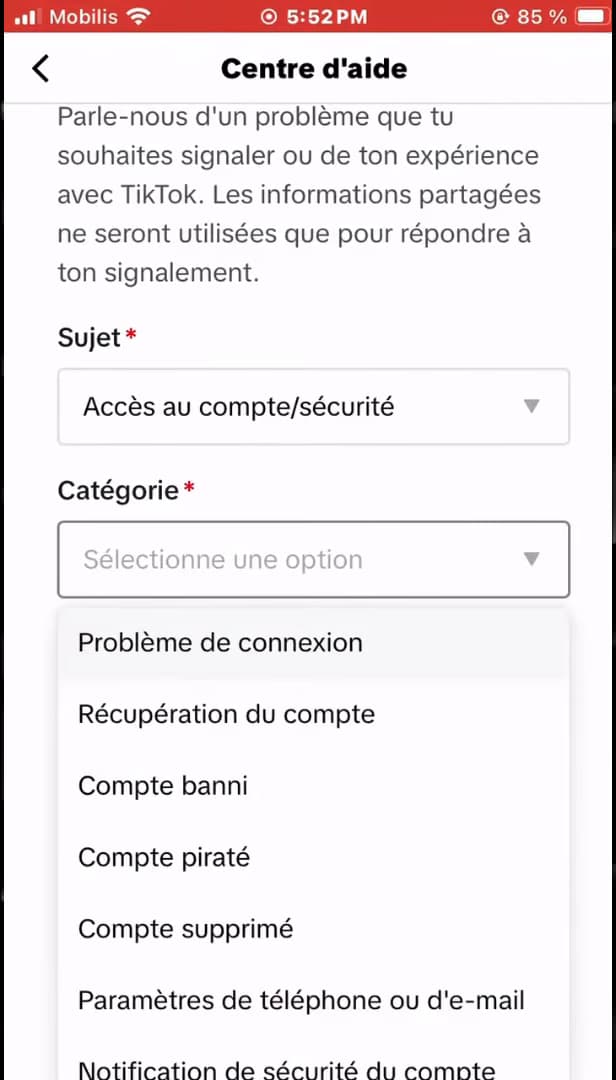
In the Help Center, choose the "Account recovery" category. The "Help Center" opens. Under "Topic," select "Account access / security," then under "Category," choose "Account recovery."
Fill in your account details
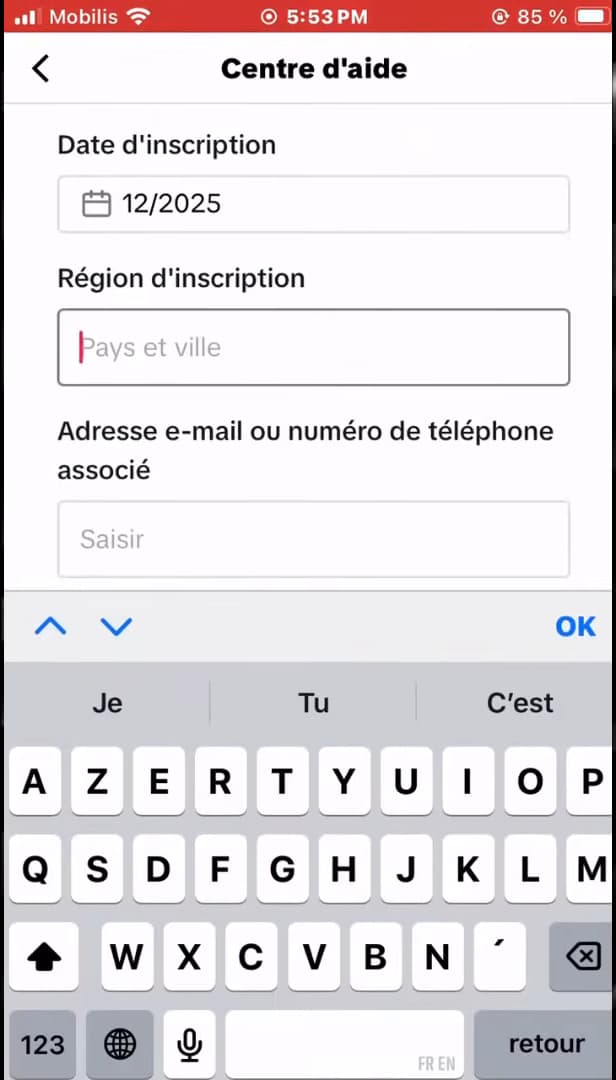
Provide as much info as you can: date, region, old email… Fill out the form with as much detail as possible: "username," "sign-up date," "sign-up region," plus the old "email or phone number" linked to it if you remember it. The more precise you are, the better you prove the account is yours.
Add proof and submit
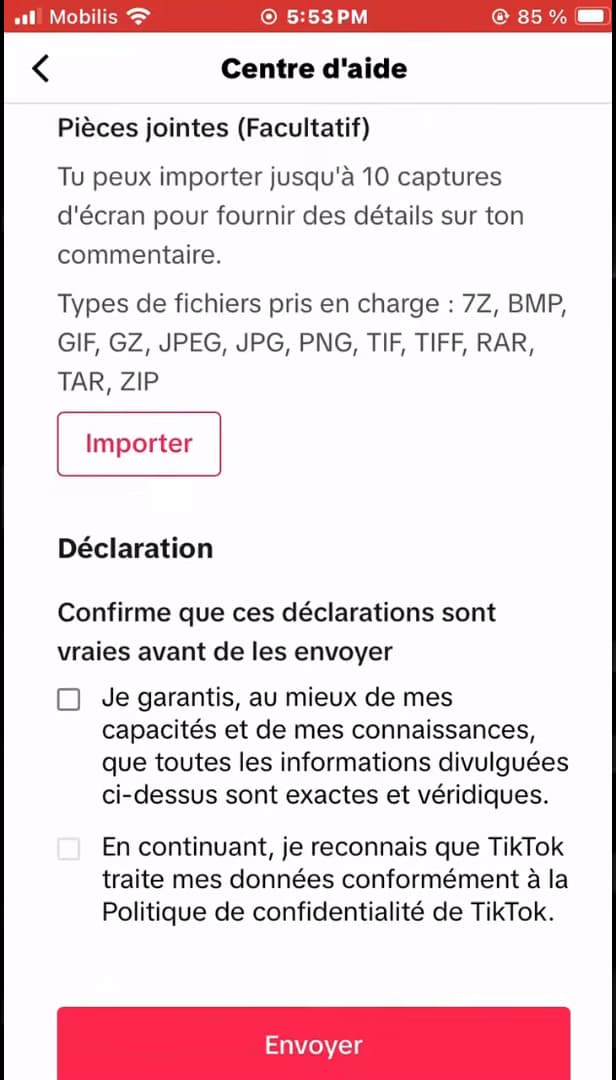
Add proof, confirm the declaration, then "Submit." Under "Attachments," you can "upload" proof (for example, an old screenshot of your profile). Check the "declaration" of honesty, then tap "Submit." TikTok support will reply by email to finalize the recovery.
Good to know
Once the form is submitted, TikTok support contacts you by email (at an address you can access) and asks a few questions to confirm you're the owner. Once verified, they help you restore access.
Good to know
- Reply "quickly and honestly" to support's questions: that's what unlocks the recovery.
- An "old screenshot" of your profile (name, photo, followers) is very useful proof.
- For the future, add "several login methods" (email + phone number + linked accounts) so you're never locked out again.
Frequently asked questions
- Can you really recover a TikTok account without email or phone number?
- Yes. By going through "Request help" and then the "Account recovery" category, you contact TikTok support directly, and they can restore access after verifying your identity.
- What should I use as proof in the form?
- Any information that proves the account is yours: exact username, sign-up date and region, old email/phone number, and a screenshot of your profile if you have one.
- How long does recovery take?
- It depends on TikTok support, which usually replies by email within a few days. Answering their questions accurately speeds up the verification.
Related tutorials
 TikTokHow to Download a TikTok VideoWant to save a TikTok video to your gallery? Here's the official method, step by step.
 TikTokHow to Make Your TikTok Account PrivateWant to control who sees your TikTok videos? Here's how to switch your account to private, step by step.
 TikTokHow to Change the Font in Your TikTok BioWant a TikTok bio with stylish lettering? Here's how to change the font, step by step.
 TikTokHow to Delete a Conversation on TikTokWant to clear a private message on TikTok? Here's how to delete a conversation, step by step.