
How to Save Your Snapchat Memories to Your Gallery
Want your Snapchat photos to be saved automatically to your phone's gallery, not just to Memories? It's a single setting to turn on once and for all. Here's how to save your Snapchat Memories to your gallery, so you never lose a snap again, step by step.
Prefer a video? Watch the full tutorial below.
Saving your Snapchat Memories to your gallery, step by step
Open your Snapchat profile

The setting is in your Snapchat profile settings. Open "Snapchat", then tap your "profile" (your Bitmoji), at the top left of the screen.
Open Settings
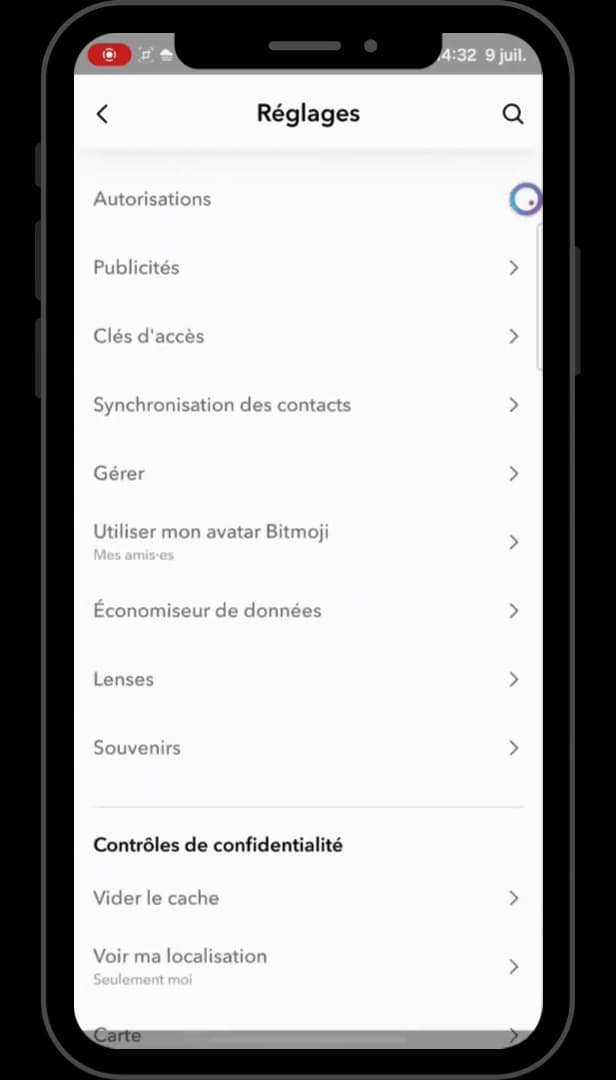
The gear icon opens all of Snapchat's settings. Tap the "gear" icon (Settings), at the top right of your profile.
Open the "Memories" section

The Memories section gathers the saving options. Scroll down through the settings to "Memories", then open that section. While you're there, turn on "Smart Backup".
Set "Save Button" to "Memories & Camera Roll"
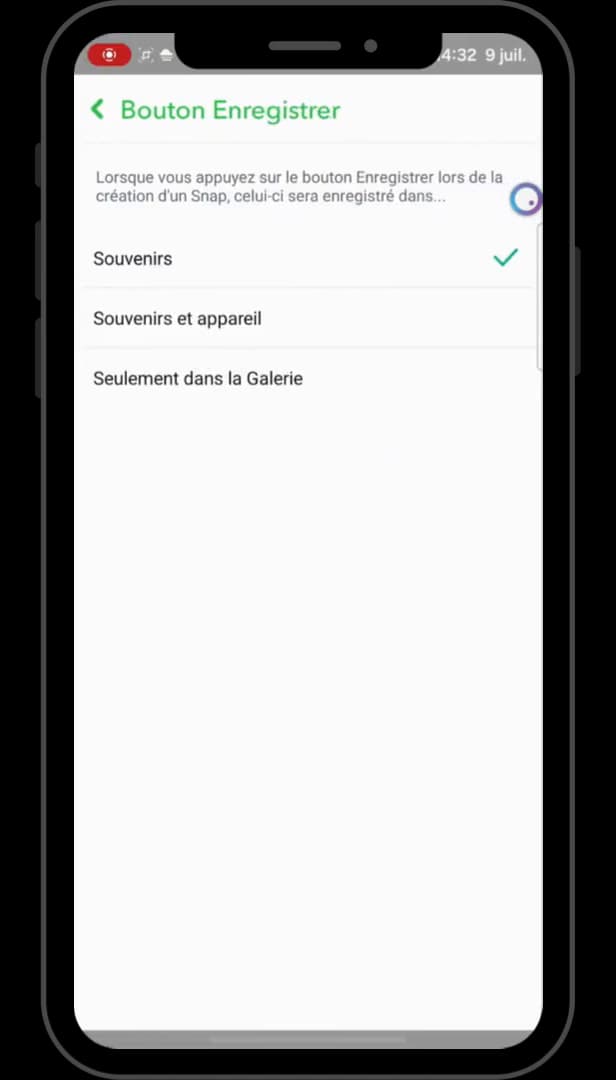
"Memories & Camera Roll" saves your snaps to the phone's gallery. Tap "Save Button", then choose "Memories & Camera Roll". From now on, every photo saved from Snapchat will go to both your Memories and your "phone's gallery".
Good to know
Once the setting is on, take a photo, tap "Save" (the down arrow at the bottom left), and choose "Memories & Camera Roll": the snap is saved in both places.
Good to know
- "Smart Backup" protects your memories even without Wi-Fi (via mobile data).
- Memories also stay accessible from the Memories tab, by swiping up on the camera screen.
- This setting only applies to "new" snaps: older ones have to be saved manually.
Frequently asked questions
- Where are Snapchat Memories saved by default?
- By default, they're saved only in Snapchat Memories, not in the phone's gallery. Setting "Save Button" to "Memories & Camera Roll" changes that behavior.
- Will my old snaps go to the gallery too?
- No, the setting applies to new saves. For older ones, open them in Memories and export them manually to the gallery.
- What does Smart Backup do?
- It backs up your memories even without Wi-Fi, using the mobile network, to avoid any loss.
Related tutorials
 SnapchatHow to Set the Snap Timer on SnapchatWant to choose how long a Snap stays on screen? Here's how to set its duration, step by step.
 SnapchatHow to create a second Snapchat accountWant a second Snapchat account? Here's how to create one and switch between your accounts, step by step.
 SnapchatHow to recover your deleted Snaps on SnapchatWant to find old Snaps or memories? Here's how to recover your Snapchat data, step by step.
 SnapchatHow to Share a Link on SnapchatWant to send a link in a Snap? Here's how to attach a URL to your Snap, step by step.