
How to change your birthday on Instagram
Entered the wrong date or want to correct it? You can change your birthday on Instagram from your personal details. Here's how to do it, step by step.
Prefer a video? Watch the full tutorial below.
Changing your birthday on Instagram, step by step
Open "Personal details"

"Personal details" gathers your account information. Go to your profile › "☰" › "Settings and privacy", open "Accounts Center", then "Personal details".
Open "Birthday"

"Birthday" shows the date linked to your account. Tap "Birthday": Instagram shows the currently saved date.
Edit and save
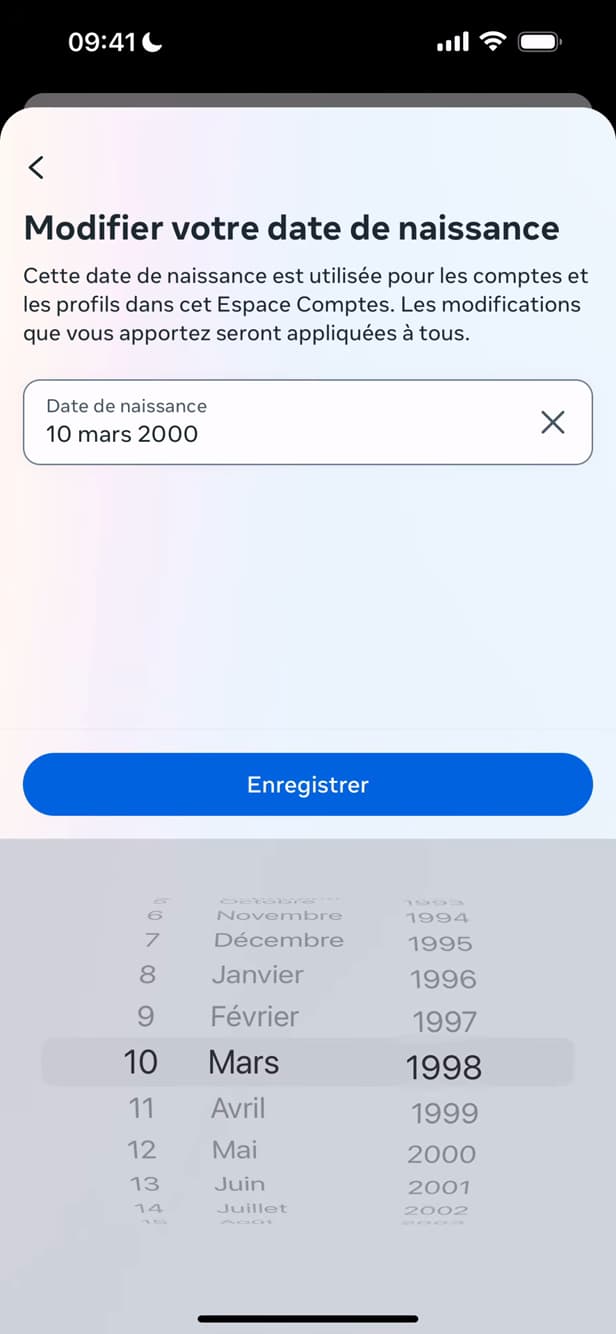
"Edit" lets you choose and save the new date. Tap "Edit", choose the new date, then confirm.
Good to know
Your birthday is now "updated" on Instagram. It stays "private" by default and does not appear on your public profile.
Good to know
- Your date of birth is "not public": it's used to tailor your experience.
- Only a "limited number" of changes is allowed over a given period.
- You must be "at least 13" to use Instagram.
Frequently asked questions
- Is my date of birth visible to others?
- No. It stays private by default and doesn't appear on your profile; it's used to personalize your experience.
- Can I change it as many times as I want?
- No. Instagram limits the number of changes over a given period to prevent abuse.
- Why does Instagram ask for my date of birth?
- To verify that you meet the minimum age requirement (13) and to tailor certain content and settings.
Related tutorials
 InstagramHow to change your bio on InstagramWant to edit your Instagram profile bio? Here's how to do it, step by step.
 InstagramHow to Change Your Instagram Account LanguageInstagram showing in the wrong language? Here's how to change the app's language, step by step.
 InstagramHow to set or change your Instagram profile photoWant to change your Instagram profile photo? Here's how to update it, step by step.
 InstagramHow to Share a Link in an Instagram StoryWant to add a clickable link to your Instagram story? Here's how, step by step.