
How to Change Your Facebook Profile Photo Without Losing Your Likes
Want to change your Facebook profile photo without losing your likes or comments? The trick is simple: instead of uploading a new image, you pick a photo you've already posted from "Suggested photos," which keeps all its reactions. Here's how to do it, step by step.
Prefer a video? Watch the full tutorial below.
Changing your Facebook profile photo while keeping your likes, step by step
Open your profile and the camera
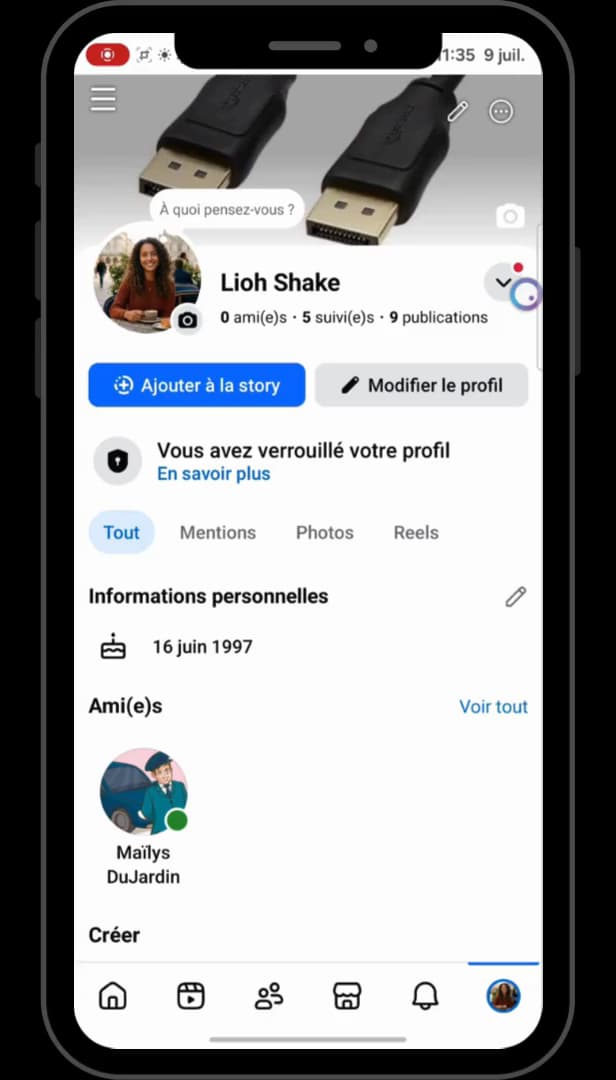
The camera icon, under your profile photo, opens the options to change it. Open the "Facebook" app, tap your "profile" in the bottom right, then tap the "camera" icon under your current profile photo.
Open the "Suggested photos" tab
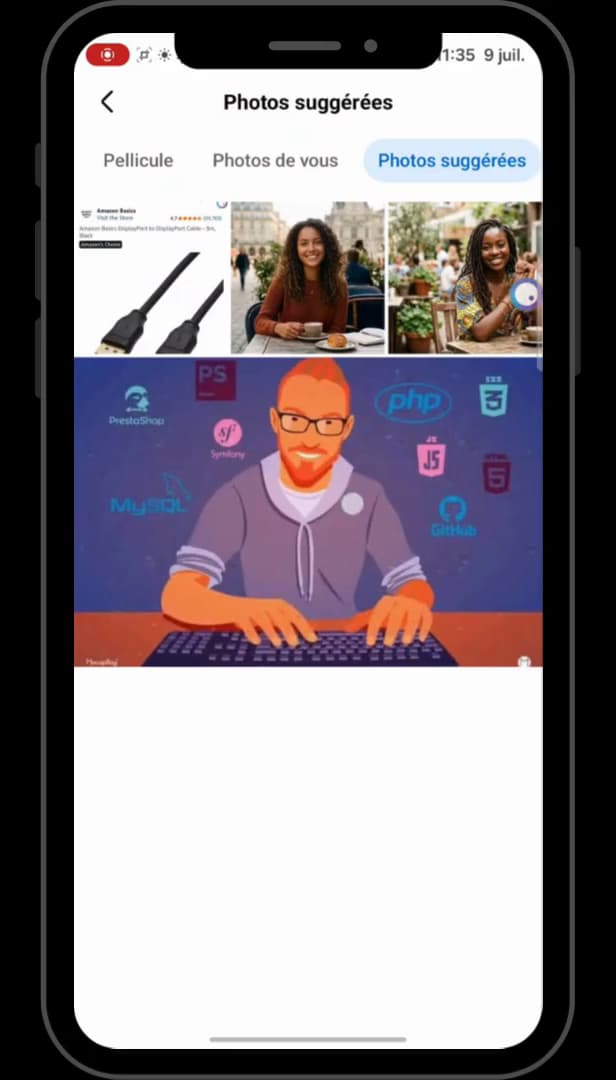
"Suggested photos" are your older posts: they keep their likes. At the top of the screen, tap "Suggested photos." These are photos you've already posted on Facebook — the ones that have already gathered likes and comments. Tap the one you like.
Save, without necessarily telling your friends
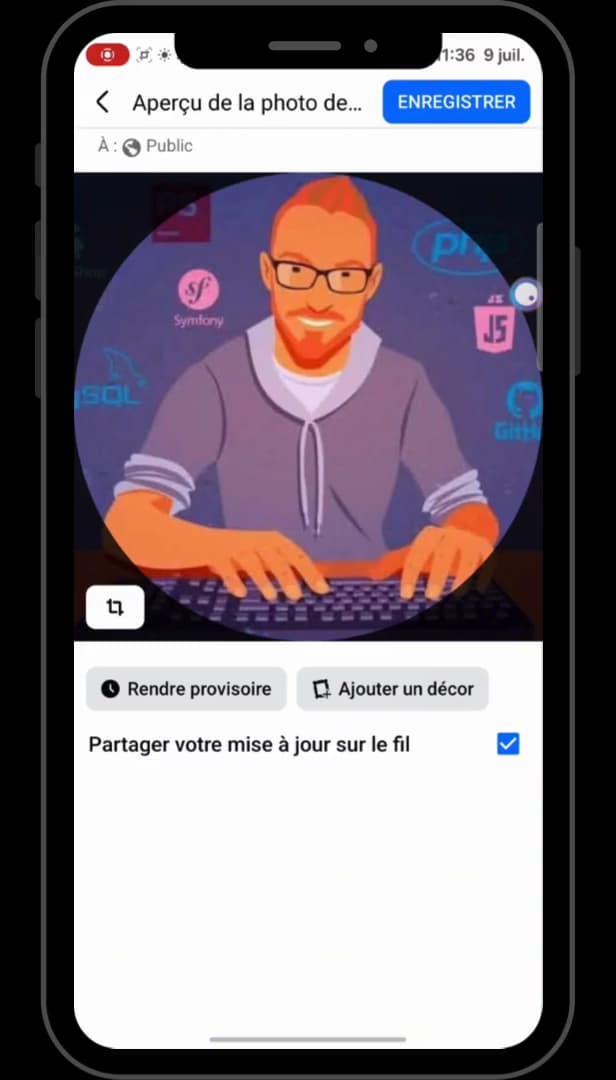
Uncheck "Share your update to feed" for a discreet change. To change your photo discreetly, uncheck "Share your update to feed" (otherwise leave it checked). Then tap "Save" in the top right.
Check that the likes are kept

The photo returns to its spot with its original likes and comments. Once the photo is set, tap it and then tap "See profile picture": you'll find your original "likes and comments," with their original date.
Good to know
This method only works with a "photo you've already posted": that's the one carrying the reactions you want to keep. A brand-new image will start from scratch.
Good to know
- Uncheck "Share your update to feed" to avoid sending a notification to your friends.
- The same principle works to change your cover photo without losing your likes.
- Your old profile photos stay grouped together in the "Profile pictures" album.
Frequently asked questions
- Can I keep the likes with a new photo?
- No. Only a photo already posted on Facebook keeps its likes and comments. An image uploaded for the first time starts with no reactions at all.
- Where do I find my old profile photos?
- In the "Suggested photos" tab when changing your picture, or in the "Profile pictures" album on your profile, which gathers all your old photos.
- Does changing my profile photo notify my friends?
- Only if the "Share your update to feed" box is checked when you save. Uncheck it for a discreet change.
Related tutorials
 FacebookHow to Change Your Facebook Cover Photo Without Losing Your LikesWant to switch your Facebook cover photo without losing its reactions and comments? Here's the method, step by step.
 FacebookHow to Change Your Facebook Cover Photo SecretlyWant to change your Facebook cover photo without your friends seeing it? Here's the discreet method, step by step.
 FacebookHow to Delete a Profile Picture on FacebookWant to remove an old Facebook profile picture? Here's how to delete it, step by step.
 FacebookHow to View and Change Your Facebook PasswordWant to view or change your Facebook password? Here's the reality and how to change it, step by step.